What's new: the Free Section moves into the main shop
iMeshh has retired the old standalone free page and rebuilt the entire free library as a category inside the redesigned shop, so freebies sit alongside paid products and benefit from the same modern UI.
Finding the Free category on the shop page
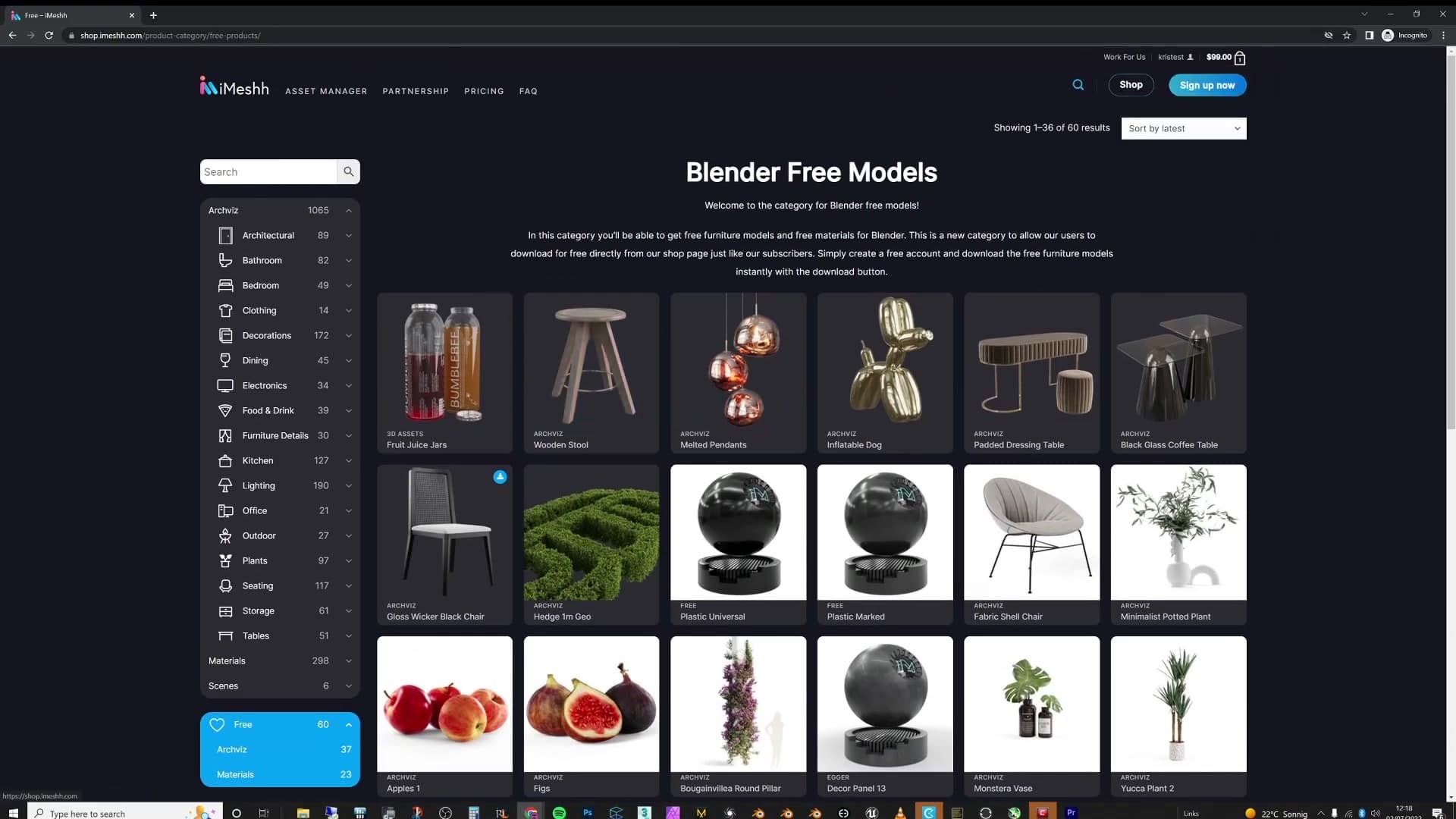
The free section is no longer a separate destination. It now lives inside the main iMeshh shop alongside every paid product, with its own category at the very bottom of the shop page. Click into Free and you get the full grid of free products laid out in the same UI as the rest of the catalogue.
Grabbing a freebie is a three-step flow. First, log in to your free iMeshh account. Then go back to the Free category and open the product you want. Hover the thumbnail, press Download, and the asset is yours.
Why the old standalone free page had to go
This change matters because the iMeshh shop has been through a full redesign. The new layout is prettier, functions more smoothly, and is the result of a long run of incremental work that the team is finally happy with, at least for now. It will almost certainly change again in the next six months, but the current version is the one that has earned its place.
The old free section was the part of the site that kept getting forgotten. It lived on a separate page that was three or four years old and increasingly hard to manage, even though a huge slice of iMeshh users are free users who deserve a proper home for their downloads. Rebuilding the shop page was the obvious moment to fix that.
So the free library moved in with the rest of the catalogue. Free products now benefit from the same modern grid, the same hover-and-download interaction, and the same ongoing UI improvements as every paid asset. No more sitting on a stale standalone page that nobody on the team wanted to maintain.
How the Free Section keeps growing
Because the free library now lives inside the shop CMS, iMeshh can flag any product as free on the fly, so every big release seeds the free section with one or two new pieces.
Marking products as free during big releases
Because the free library now lives inside the same CMS that runs the rest of the shop, any product can be flagged as free on the fly. The moment that flag goes on, the product shows up inside the Free category alongside everything else: same product card, same download flow, just no price attached.
iMeshh uses this to keep the section alive rather than letting it stagnate. Every time a big release ships, one or two products from that drop get marked as free, so the free category quietly refills itself with fresh work instead of slowly going out of date.
In practice that means the free section is now tied to the release cadence of the rest of the library. If you're watching for new iMeshh drops, you can expect a freebie or two to land in the Free category every time a major release goes out.
Thousands of downloads in the first week
The new section had only been live for around a week before this video went out, and in that time it had already pulled thousands of downloads, entirely off the back of existing iMeshh users stumbling across it on the redesigned shop page. The YouTube announcement is really the second wave; most of the channel's audience hadn't seen the new section yet.
Roughly 60 free products were available at the point of recording. My back-of-envelope maths: if a thousand people each download every free product in the section, that's 60,000 downloads in one push. That would blow my mind.
The ask from here is simple. Head over to iMeshh, create a free account, and download whatever you want from the free section and keep checking back, because the catalogue is designed to keep refilling with every major release.
What's coming next from iMeshh
A teaser for the upcoming garden scene release and a DALL·E 2 experiment, plus the call to make a free account and start downloading.
A DALL·E 2 experiment is on the way
One more thing before signing off: access to DALL·E 2 just came through, and a video about it is on the cards. There are already plenty of DALL·E 2 explainers floating around, but the idea here is to do something specific with it rather than another general overview. The actual concept is being kept under wraps for now.
That's the lot. Subscribe if you feel like it, don't if you don't, and thanks for watching.
Tools and credits
Everything mentioned in this tutorial, with links.
- Blender (the renderer this entire build runs in).
- iMeshh (studio platform: project management, client review, asset library, invoicing). The asset library used in this tutorial is included with every iMeshh Pro plan.
- Poly Haven (free CC0 textures and HDRIs).
Pillar guide: Imeshh Tools hub